





Technical Integration Guide · 2026
SAP to Zycus.
What the integration actually involves.
Most integration conversations collapse into vague promises or premature complexity. This guide lays out the architecture plainly: what connects, how it connects, what your team owns, and what Zycus owns, across ECC, S/4HANA, and every state in between.
Request the integration design workshop →Request the integration guide
Zycus Sap integration guide
SAP enterprise ERP market share
SAP ECC customers globally
Still on ECC, not yet on S/4HANA
ECC mainstream support end date
Sources: Gartner (end-2024); Apps Run The World (2024 ERP revenue); Basis Technologies SAP Adoption Model. More than 60% of ECC customers have not yet licensed S/4HANA; migrations take 18 to 36 months.
Why this matters now
The ECC clock is running. Integration is the real conversation.
The ECC clock
Only ~39% of ECC customers licensed S/4HANA by end-2024. More than 60% remain on ECC today. The 2027 support deadline is not moving.
The shared challenge
Every best-of-breed S2P suite faces the same task: clean hand-off of vendor master, POs, invoices, and spend data between S2P and SAP's financial backbone.
What this guide covers
Architecture for ECC and S/4HANA. Two integration models. GenAI mapper. eInvoice touchpoints. Master-data design. Scope boundary. Real objections, direct answers.
Architecture
The Zycus and SAP connection, laid out plainly
Four nodes. Two directions. One consistent pattern whether you are on ECC, already live on S/4HANA, or running both in parallel during a phased migration.
Your ERP
SAP
ECC · S/4HANA · BTP. Financial system of record.
Optional
Middleware
Boomi · MuleSoft · Azure IS · SAP CPI. Transport layer.
Mapping brain
Zycus iSaaS
API gateway · GenAI Mapper. Transformation · Error monitoring.
S2P apps
Zycus S2P
Intake → Sourcing → P2P → eInvoice. Ends at PO and Invoice.
Your middleware COE provides the transport tunnel. Zycus iSaaS owns all mapping logic and field transformation. Middleware does not need to understand SAP field semantics.
No middleware COE. Zycus iSaaS connects directly to SAP via OData (S/4HANA) or RFC/BAPI (ECC), handling both transport and transformation. Works well for greenfield S/4HANA. Fewer moving parts.
Integration touchpoints
Every module. Every SAP object. Every direction.
| Module | Direction | What moves | SAP objects |
|---|---|---|---|
| Vendor / Supplier Master | ↓ Inbound | SAP vendor master to Zycus supplier golden record. Company code and purchasing org carried as attributes. | LFA1 / LFB1 (ECC) · Business Partner (S/4HANA) |
| User Master / SSO | ↓ Inbound | User identity sync and single sign-on. Approval hierarchy optionally from SuccessFactors. | SAML 2.0 / LDAP · Entra ID · SuccessFactors |
| Org Structure | ↓ Inbound | Cost centres, GL accounts, WBS elements, plants, purchasing orgs for routing, coding, validation. | Cost centre master · GL · WBS / PS · Plant data |
| Intake Management | Internal | Guided intake, smart routing, workflow approval. Zycus-internal only, no SAP integration at this layer. | No SAP touchpoint |
| Sourcing | ↑ Outbound | New supplier from a sourcing event pushed to SAP vendor master. Sync keeps both in step. | Vendor master create / update · LFA1/LFB1 · BP |
| Contracting | ↑ Outbound | Executed contracts pushed to SAP as outline agreements and scheduling agreements. | ME31K · Scheduling agreement · ME31L |
| Supplier & Risk Mgmt | ⇄ Bi-directional | Supplier onboarding (KYC, risk scores) and SAP vendor master stay synchronised. Risk flags update Zycus. | LFA1/LFB1 bi-directional · Risk-status fields |
| eProcurement / P2P ★ | ↑ Outbound | Requisition to approval to PO creation, the last Zycus step. GR, MIRO matching, F110 remain in SAP. | BAPI_PO_CREATE / ME21N · MIGO · MIRO · F110 |
| eInvoice, Invoice Post NEW | ↑ Outbound | Invoice validated in Zycus, 3-way matched, then posted to SAP pre-validated. Fewer MIRO failures. | MIRO / FB60 · BAPI_INCOMINGINVOICE_CREATE |
| eInvoice, Payment Status NEW | ↓ Inbound | After F110, payment confirmation and date feed back into Zycus Supplier Network. Suppliers see lifecycle. | F110 · FBL1N · Payment advice extraction |
| Spend Analysis | ↓ Inbound | AP spend, GL actuals, cost centre feeds pulled into Zycus for AI UNSPSC classification and analytics. | SAP FI / CO / CO-PA · AP actuals · GL extracts |
| PO Status Feedback | ↓ Inbound | GR confirmation, invoice status, payment completion fed back so suppliers see PO lifecycle. | MIGO (GR) · MIRO · F110 |
★ PO creation is the last Zycus step. GR and payment are handled in SAP ECC.
The full picture
Every module to its SAP ECC touchpoint
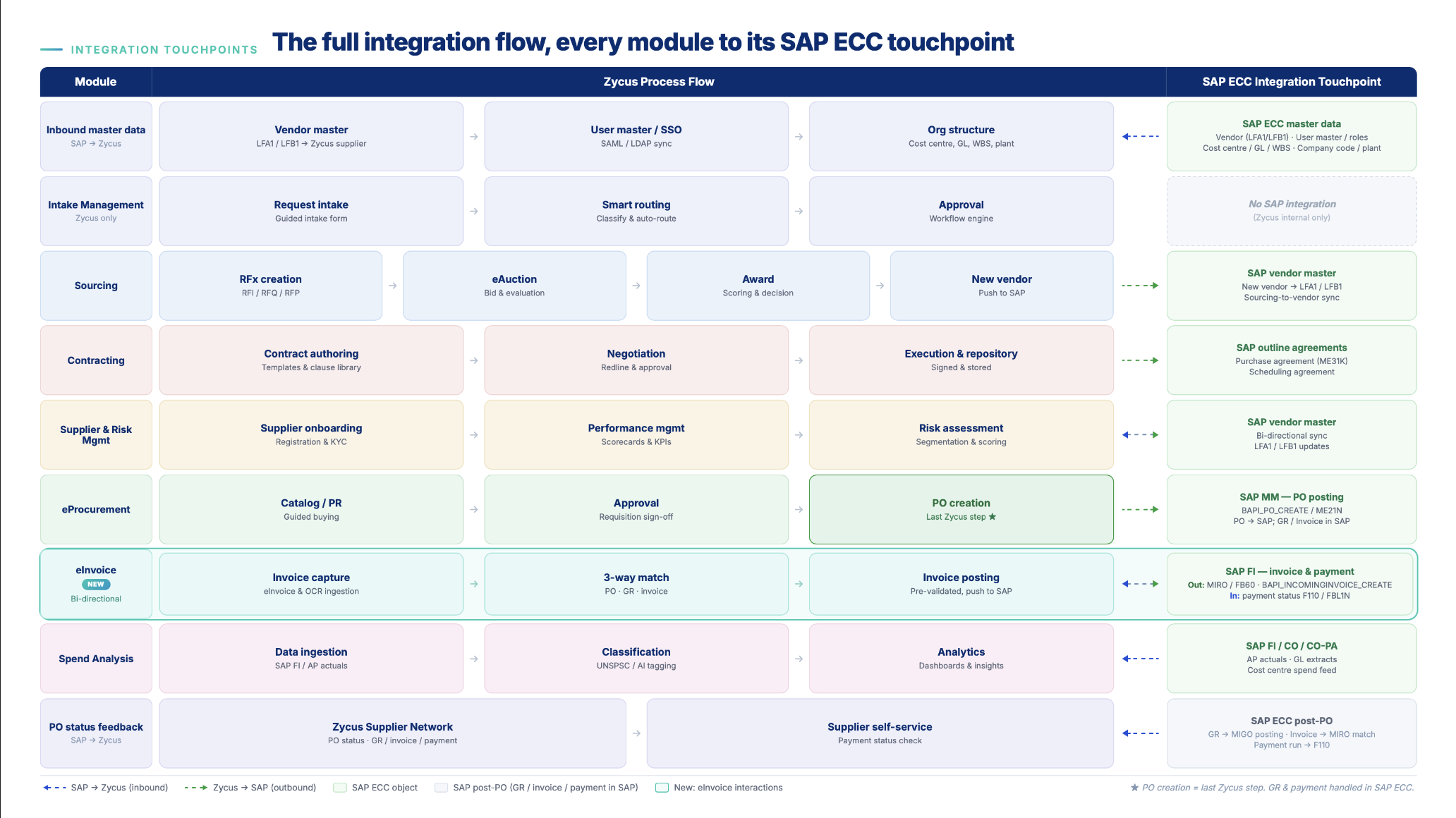
Integration models
Two models. The difference is who owns the mapping.
Model A
Integration as a Service (iSaaS-led)
Zycus builds and maintains the mapping logic inside iSaaS. Works with or without existing middleware.
- Mapping logic
- Zycus iSaaS, our responsibility and SLA
- Middleware role
- Transport only, no transformation logic
- Your team's effort
- SAP enablement, connectivity, UAT. Mapping is not yours.
- AI Mapper
- Live field-mapping session, one session, signed off
- Best when
- Speed matters or COE bandwidth is constrained
Model B
Customer-Owned Integration
Your integration COE (Boomi, MuleSoft, Azure IS, SAP CPI) builds and maintains mapping logic.
- Mapping logic
- Your COE, your responsibility and change management
- iSaaS role
- API gateway and error monitoring only
- Your team's effort
- Majority. COE builds all mapping and owns all logic.
- AI Mapper
- Available as reference, Zycus does not run it
- Best when
- COE ownership is a hard governance requirement
Effort split, Model A (iSaaS-led) · illustrative, confirmed at design workshop
Zycus: mapping, logic, AI session, monitoring.
Your team: SAP enablement (IDocs / BAPIs / OData), connectivity, payload validation, UAT.
Model B inverts this ratio.
The differentiator
Where integration projects lose weeks, and why we don't
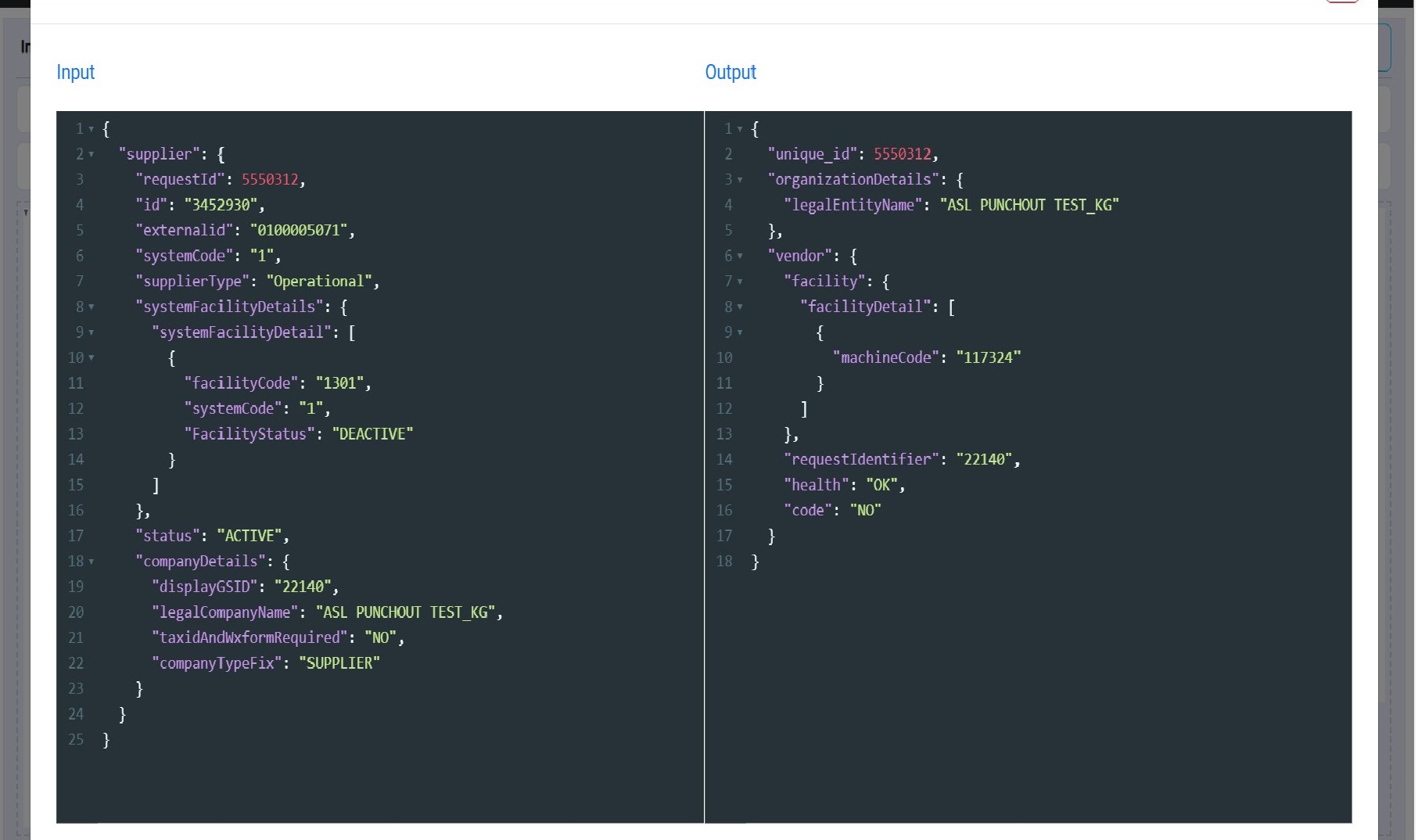
The SAP vendor master alone has 200+ fields across LFA1, LFB1, and purchasing-org views. Competitors map this in offline spreadsheet exchanges over weeks. We do it live, in one session, with AI confidence scoring.
Live mapping session
Load your SAP source payload and the Zycus target schema. The AI maps field-to-field on screen, in the room. What used to take weeks takes an afternoon.
SAP-native intelligence
The mapper knows LFA1, LFB1, ME21N, MIGO, MIRO, and BAPI_INCOMINGINVOICE_CREATE from actual SAP integration experience embedded in the model.
Confidence scoring
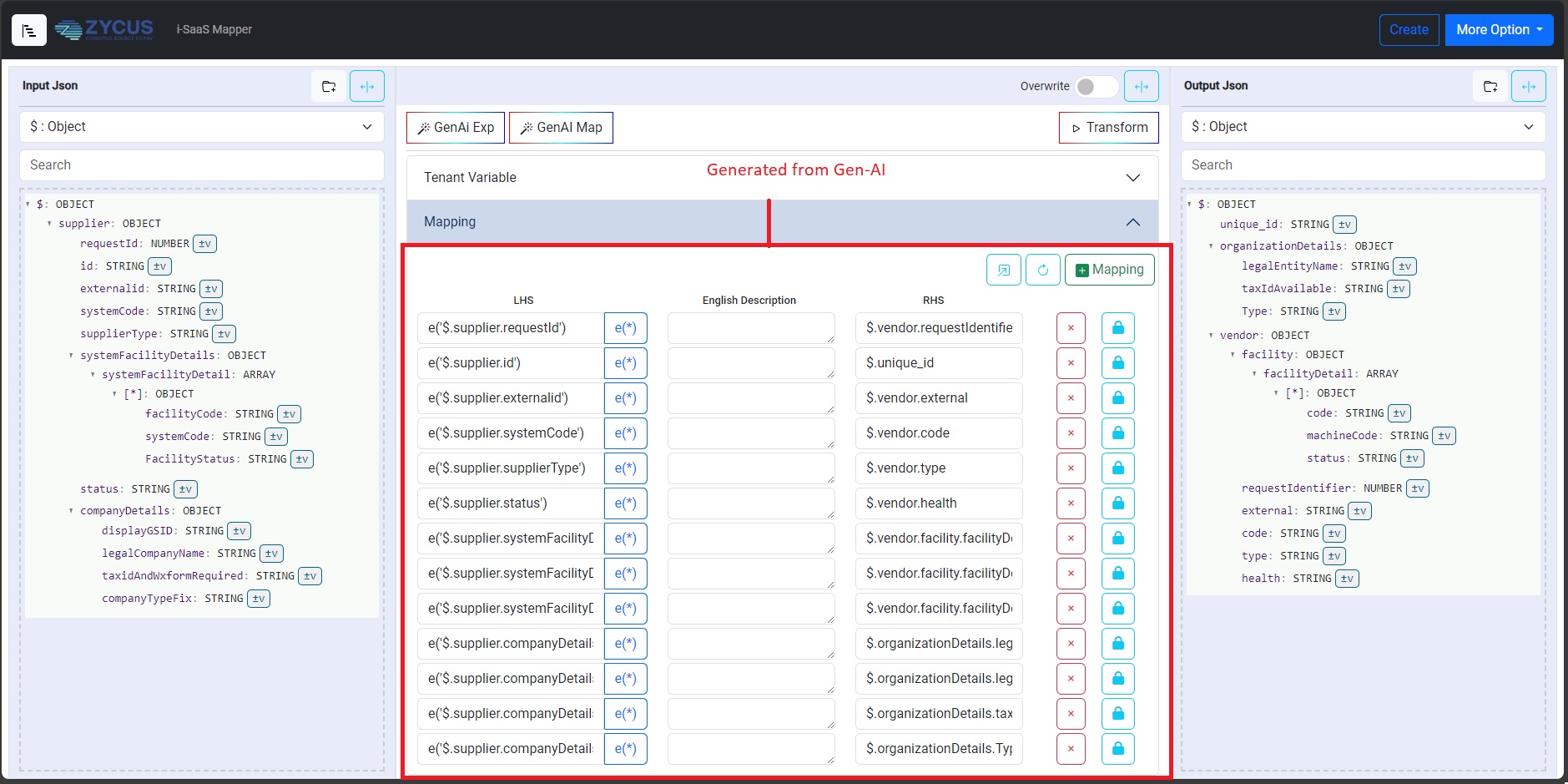
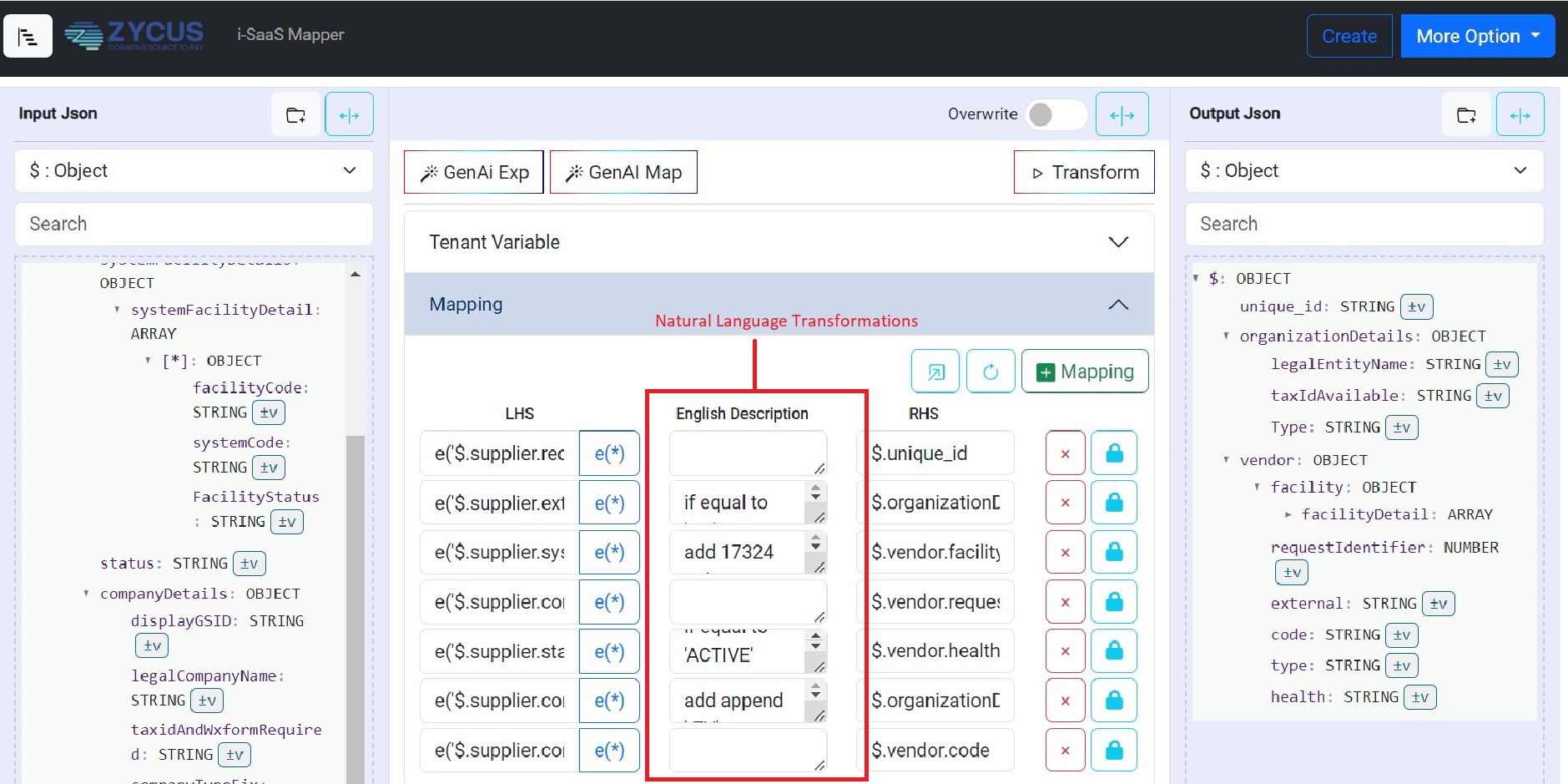
Each mapping carries a confidence score. Edge cases are flagged, not silently wrong. Logic is described in plain English for business and technical reviewers.
Load schemas
Upload SAP source (JSON, XSD, IDoc) and Zycus target schema. Any format.
AI auto-maps
GenAI generates field-to-field mappings with plain-English transformation rules.
Review + adjust
Review mappings against confidence scores. Adjust edge cases. Lock and sign off.
Live transform
Run against a real SAP test payload. See the Zycus output. Validate before SIT.
The GenAI Mapper, in product
From two schemas to a validated transform, on screen.
Select input / output schemas
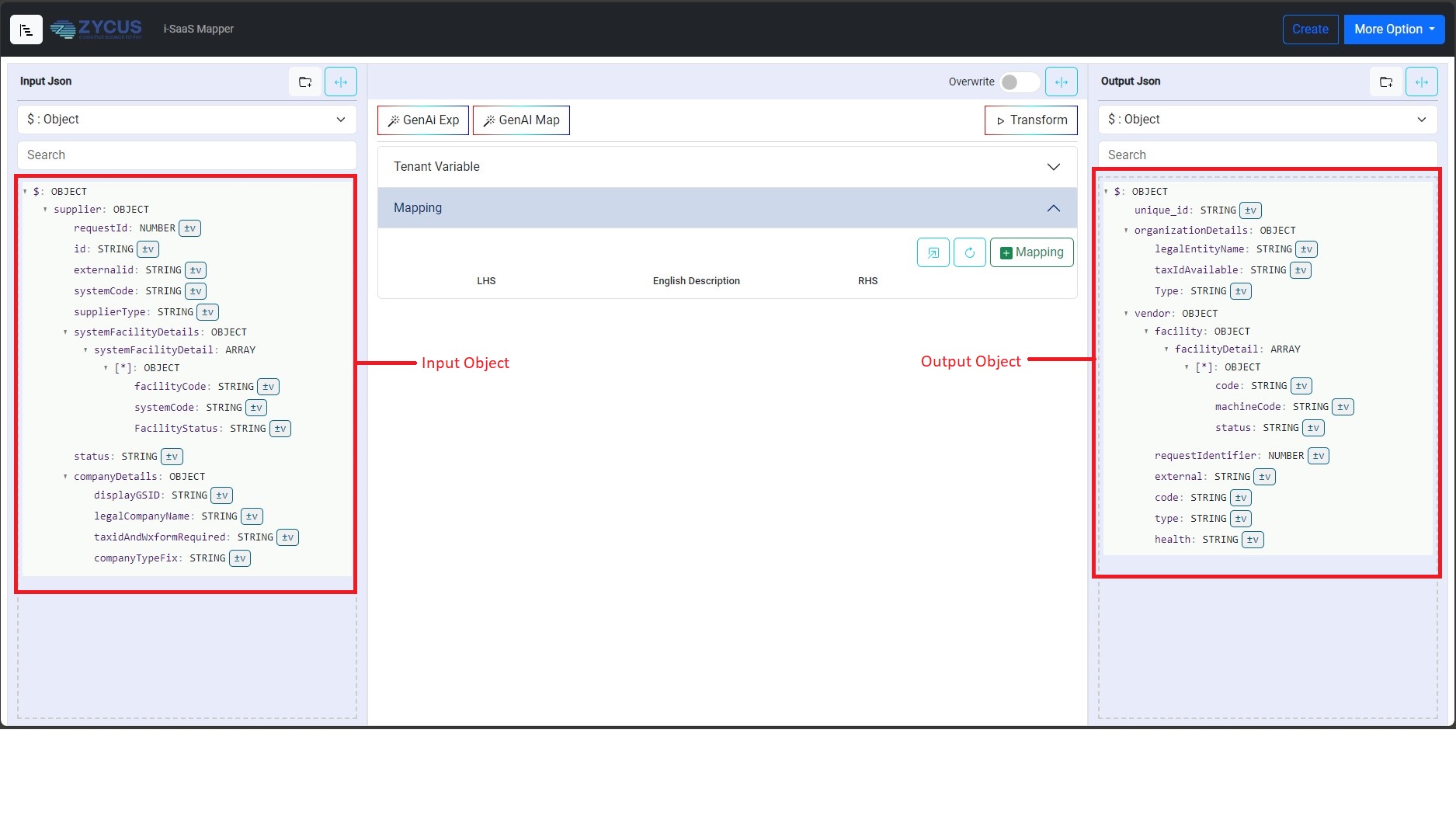
AutoMap with AI
Natural-language transformations
Final transformed output
Master data design
The vendor master problem, and the correct pattern
In SAP ECC
- Vendor created per company code + purchasing org combination.
- General data in LFA1, financial in LFB1, purchasing in LFM1.
- Same legal entity equals multiple records across org dimensions.
- S/4 migration: vendor master becomes Business Partner, a change in SAP, not in Zycus.
- Risk: duplicates, orphaned records, sync errors if not designed correctly.
In Zycus
- One supplier equals one golden record, deduplicated on a primary key you define.
- Company code and purchasing org carried as attributes, not separate records.
- Facility / plant views as sub-records, same entity, different scope.
- Sync engine writes back to SAP in correct per-company-code format automatically.
- Dynamic workflow per facility, region, or risk tier, not hardcoded to SAP.
Worked example: one supplier across three company codes
Company codes carried as org attributes. Auto-sync, no manual translation.
| Company code | Payment terms | Local tax ID | Status |
|---|---|---|---|
| US01 | NET_30 | 12-3456789 | ACTIVE |
| US02 | NET_45 | 12-3456789 | DEACTIVATED |
| EU01 | NET_60 | DE-123456789 | ACTIVE |
golden record in Zycus
Three company codes, one deduplicated supplier. The sync engine writes back per-company-code automatically.
Scope boundary
What the standard offer covers, and what it doesn't
Scope ambiguity is what turns an 8-month integration into an 18-month one. This is the standard boundary. Every item is confirmed or classified before design begins.
Included in the standard offer
- ✓Integration-as-a-Service via iSaaS (mapping, logic, monitoring, AI session)
- ✓Onsite design workshops and solution configuration for agreed scope
- ✓TPRM connectors via App Extend (EcoVadis, D&B, Moody's, Trustpair)
- ✓eInvoice integration, outbound invoice posting and F110 payment status feed
- ✓Data migration templates and load support
- ✓Go-Value workshop(s), mandatory pre-go-live
- ✓Train-the-Trainer enablement via Zycus University
- ✓UAT support and go-live hypercare (4 weeks pilot, 2 weeks per wave)
Treated as a change item
- △Modules or business units beyond the signed scope
- △Integration touchpoints not in the agreed inventory
- △Customer-owned build effort in middleware (if Model B)
- △Direct materials or bespoke custom development
- △Third-party TPRM licences, customer-owned
- △End-user training beyond Train-the-Trainer
- △Change management on the customer's side
- △SAP-side custom ABAP development (Z-objects, user-exits)
Field intelligence · real conversations
Integration objections SAP teams raise, and direct answers
"We've slipped the integration timeline twice already. What's different this time?"
The touchpoint inventory is locked as a signed document at the design workshop before any build. Every touchpoint is in or out. Any discovery post-kickoff is a change item with an explicit quote. Ownership is explicit: Zycus owns mapping logic and SLA, you own SAP enablement and UAT.
"Do we need separate Zycus instances for ECC and S/4HANA mid-migration?"
No. Single instance is the proven pattern. During a phased migration, iSaaS routing directs PRs, POs, and invoices to the correct ERP backend by business unit and migration wave. Users see one Zycus UI throughout. A second instance doubles configuration and change-management cost for no technical gain.
"Our Boomi COE wants to own the integration logic. Can Zycus work that way?"
Yes, that is Model B. Zycus exposes clean, versioned APIs, runs the iSaaS gateway, and monitors error responses. Your COE builds and maintains all mapping. The trade-off is honest: COE bandwidth becomes the critical path. If ownership is a hard governance requirement, Model B is the right call.
"When we move to S/4HANA, does the Zycus integration have to be redone?"
No. The Zycus S2P configuration does not change. The vendor master to Business Partner schema change is handled at the iSaaS or middleware mapping layer, a contained, scoped update. Your ABAP team updates extraction and field mapping, tests in a sandbox, and cuts over. The same pattern every S2P suite uses.
"We have 40+ company codes across 20 countries. Won't Zycus make the mess worse?"
It solves it, not amplifies it. In Zycus, one supplier equals one golden record, deduplicated on a key you define. Company codes are carried as attributes, and the sync engine writes back per-company-code automatically. The dedup key, sync ownership, and write-back rules are confirmed in the master-data design session, not assumed.
"Mixing goods and services on POs keeps causing MIGO / GR failures."
Zycus enforces category segregation at the requisition stage, before the PO is created. Business rules prevent a cart mixing goods and service line items, so the user corrects it at point of entry. What reaches SAP's PO API is always a cleanly-typed PO. The rules are configurable and set in the design workshop.
"Who owns what after PO creation? We don't want Zycus touching our AP."
For procurement, PO creation is the last Zycus step. After it posts via BAPI_PO_CREATE, everything that follows is SAP: MIGO, MIRO, and F110. For eInvoice, Zycus 3-way matches then posts a pre-validated invoice; what flows back after F110 is payment status only, a read-only feed. SAP stays the system of record.
"We have existing defects with our current tool and SAP. Will those carry over?"
Not by default, but they must be surfaced before go-live. We run an SAP-side integration health check as part of the design workshop, document every known defect, classify it Zycus-side or SAP-side, assign an owner, and set a resolution milestone before SIT. Included under Model A, not an extra.
Where we go from here
Three decisions that unlock the design
None require a long lead time. They can be resolved in one working session with the right people: your SAP ABAP lead, your integration COE contact, and your procurement architect.
Choose the integration model
Model A (iSaaS-led) or Model B (COE-owned). Determines who builds the mapping, who runs the AI session, and your resource commitment.
Unlocks: effort estimate + timeline
Confirm the touchpoint inventory
Walk each touchpoint: SAP ECC/S4, Entra ID, eInvoice scope, SuccessFactors, TPRM providers. Each gets a yes or no. Anything unconfirmed is a change item.
Unlocks: scope boundary + baseline
Run the integration design workshop
One day. SAP team, Zycus team, COE if applicable. Run the GenAI mapping session live. Exit with a signed-off integration design document.
Unlocks: build can start
Ready to lock the design?
One working session. The right people. A signed-off integration design document.