


Accounts payable automation software digitizes the invoice-to-payment lifecycle. It replaces manual, paper-based AP tasks with automated workflows for invoice capture, validation, approval routing, and payment execution — reducing errors, speeding up cycle times, and strengthening financial controls across the procure-to-pay function.
Read more: The Ultimate Guide to Accounts Payable 2026: Process, Automation & Best Practices
Why Accounts Payable Automation Software Matters in Procurement
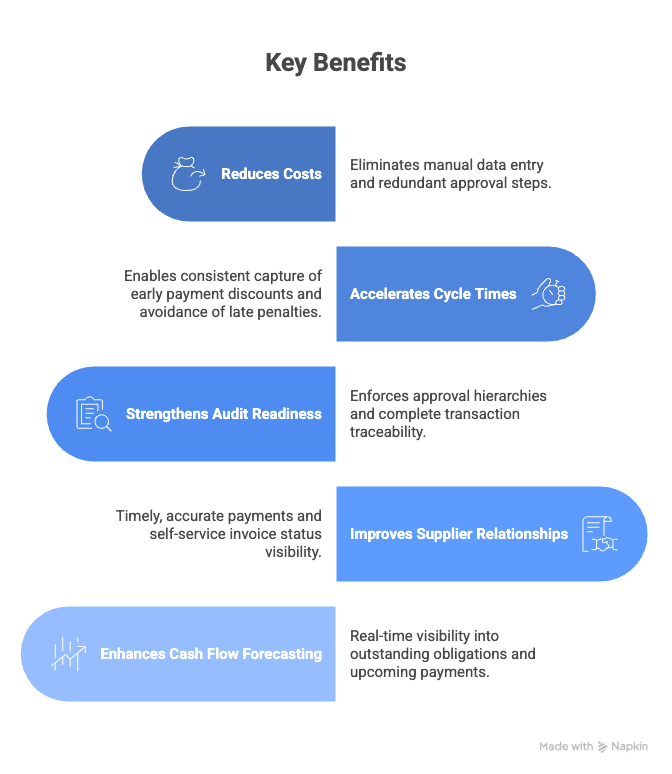
Without invoice processing software, organizations face late payment penalties, duplicate payments, missed early payment discounts, and poor visibility into cash commitments. Manual AP processes also create compliance gaps — approvals are hard to trace and policy enforcement is inconsistent. For procurement and finance teams, automating AP directly impacts cost savings, supplier satisfaction, and audit readiness.
The Core Process of Accounts Payable Automation
The process begins when an invoice arrives via email, EDI, supplier portal, or mail. Invoice processing software captures the document and extracts key fields — supplier name, invoice number, line items, amounts, and payment terms. The extracted data is validated against purchase orders and goods receipts through two-way or three-way matching.
Once matched, the system routes the invoice through the appropriate AP workflow for approval. Routing logic considers invoice value, cost center, budget thresholds, and exception conditions. Approvers review and act on invoices directly within the platform.
After approval, invoices are posted to the ERP for payment scheduling. Payment automation batches payments, optimizes timing against discount terms, and executes disbursements via ACH, wire, virtual card, or check. The system logs every action with a full audit trail.
The cycle closes with reconciliation — payment records are matched back to invoices and purchase orders, ensuring the books reflect accurate obligations.
Core Components of Accounts Payable Automation
Read more: Strategic Benefits of Accounts Payable Automation
Intelligent Invoice Capture. AP automation tools use OCR and machine learning to convert invoices in any format — PDF, image, XML, or EDI — into structured data, eliminating manual keying.
Automated Matching Engine. Compares invoice data against purchase orders, contracts, and receiving records. Auto-approves clean invoices and flags discrepancies for review.
Approval Workflow Engine. Routes invoices to the right stakeholders based on organizational rules, spend categories, or dollar thresholds. Supports escalation, delegation, and parallel routing.
Payment Orchestration. Consolidates approved invoices into optimized payment runs, manages scheduling against discount windows, and sends remittance advice to suppliers.
Compliance and Audit Controls. Enforces segregation of duties and policy adherence. Every invoice, approval, and payment is logged in a tamper-proof audit trail.
Analytics and Reporting. Real-time dashboards cover outstanding liabilities, aging reports, discount capture rates, and processing bottlenecks.
Read more: Leveraging Accounts Payable Automation to Stay Ahead in a Competitive Market
KPIs in Accounts Payable Automation Software
| Dimension | Sample KPIs |
| Efficiency | Invoice cycle time, touchless rate, cost per invoice |
| Compliance | Three-way match rate, policy exception rate, audit findings |
| Financial Impact | Discount capture rate, duplicate payment rate, late penalty incidence |
| Supplier Outcomes | Days payable outstanding, on-time payment rate |
Key Terms in Accounts Payable Automation Software
- Three-Way Matching: Comparing an invoice against its purchase order and goods receipt to validate accuracy before payment.
- Touchless Processing: Invoices that flow from receipt to payment without any manual intervention.
- Digital Invoicing: Submitting and processing invoices electronically, eliminating paper-based exchange.
- Early Payment Discount: A price reduction for paying before the standard due date, e.g., 2/10 net 30.
- Goods Receipt: A record confirming that ordered goods or services have been received, used as a matching checkpoint.
- Straight-Through Processing: End-to-end invoice handling from capture to payment with no manual touchpoints.
- Payment Run: A scheduled batch of approved payments, grouped by method, currency, or supplier.
- Invoice Aging: A report categorizing outstanding invoices by days elapsed since receipt or due date.
Top Accounts Payable Automation Software
- Zycus Accounts Payable Automation Software – Enterprise-grade AP automation with AI-enabled workflows and integrated procurement capabilities.
- Tipalti – Global AP automation platform with multi-entity support, compliance controls, and mass payments.
- Bill / Bill.com AP/AR – Popular AP automation for invoice processing, approvals, and payment scheduling.
- AvidXchange – AP automation solution with strong ERP and accounting integrations for mid-market and enterprise firms.
- Stampli – Collaborative AP workflow tool focused on invoice processing and exception management.
FAQs
Q1. What is accounts payable automation software?
It digitizes the invoice-to-payment lifecycle — automating capture, matching, approval routing, and payment execution to replace manual AP tasks.
Q2. How does AP automation differ from ERP AP modules?
ERP modules handle transaction recording and posting. AP automation tools add intelligent capture, automated matching, and dynamic workflow routing on top of the ERP.
Q3. What invoice formats can it process?
Most platforms handle PDF, image, XML, EDI, and email-embedded invoices. Advanced invoice processing software uses template-free extraction for non-standard formats.
Q4. How does it improve compliance?
It enforces approval hierarchies, segregation of duties, and policy rules automatically. Every transaction is logged with a time-stamped audit trail.
Q5. Can it integrate with existing systems?
Yes. Most AP automation tools connect to ERPs, procurement suites, and banking systems through APIs or pre-built connectors.
Q6. What is the difference between AP automation and payment automation?
AP automation covers the full invoice lifecycle from receipt through approval. Payment automation focuses on the disbursement stage — scheduling, executing, and reconciling payments.
Q7. When should an organization invest in AP automation?
When invoice volumes cause backlogs, manual errors lead to duplicate or late payments, or audit requirements demand stronger controls and traceability.
References
- Unlocking the Strategic Benefits of Accounts Payable Automation
- Leveraging Accounts Payable Automation to Stay Ahead in a Competitive Market
- The Ultimate Guide to Accounts Payable 2026: Process, Automation & Best Practices
- Whitepaper: Accounts Payable Automation Survey: Discover Success
- eBook: Accounts Payable Trends & Automation Insights
- Whitepaper: Building a Business Case for AP Process Automation
- What CFOs Need to Know Now about AP Automation ROI