


WHAT IS CONTRACT REDLINING?
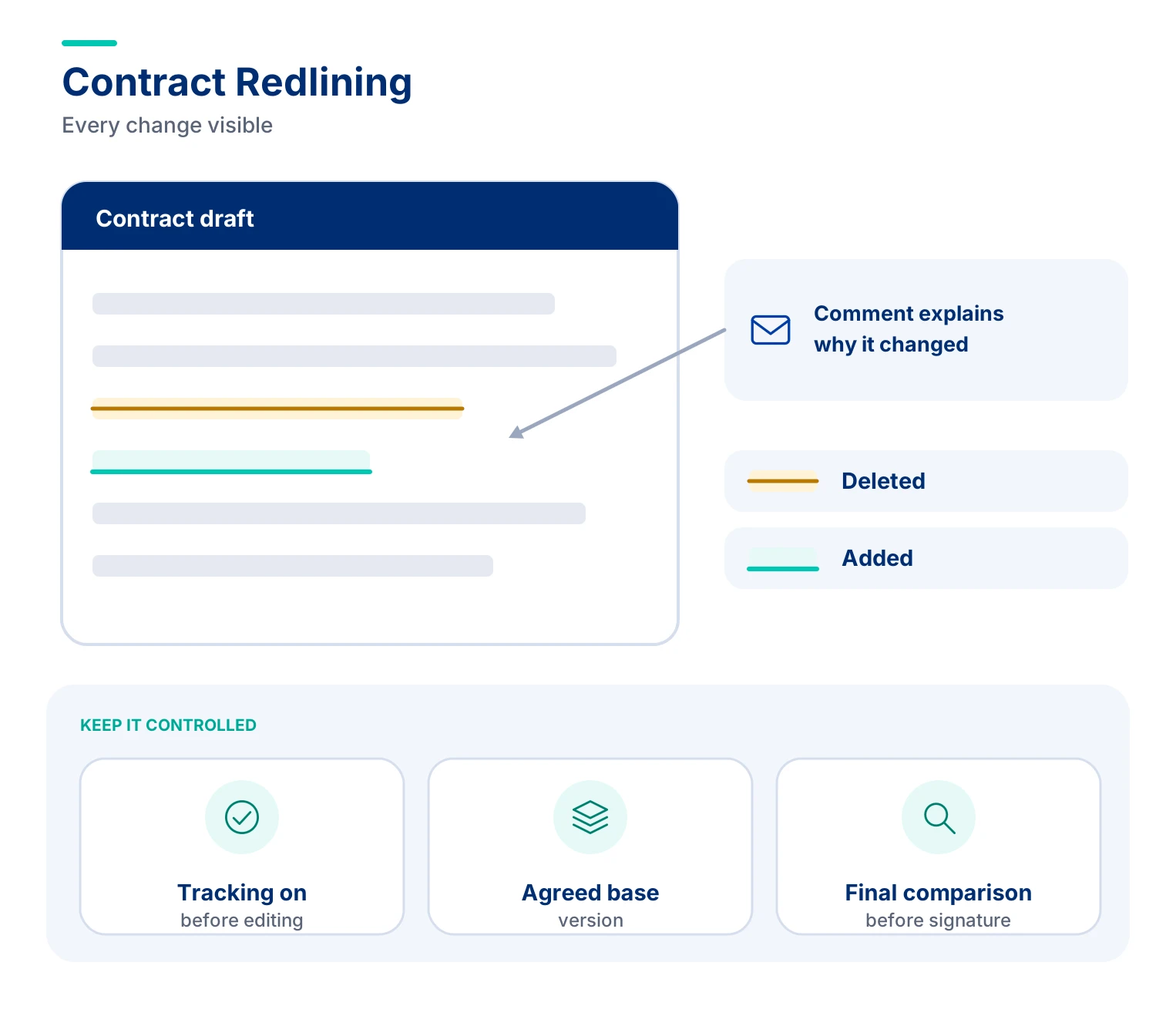
Contract redlining is the practice of marking proposed changes to a contract draft in a visible way, usually with tracked changes, so every party can see what was deleted, added or edited. It is used during negotiation so that each side reviews, accepts or rejects each change until the text is agreed.
WHY IT MATTERS IN PROCUREMENT?
Contracts pass between buyer, supplier and legal teams many times before signature. Without clear markup, small changes can slip in unseen, and the signed text may differ from what one side thought it agreed. Redlining makes each change visible and attributable, so the negotiation is controlled and the final document is reliable.
It also affects speed. Contract delays often come from unclear changes, repeated rounds and version confusion. Good redlining habits, such as marking changes against the right base version, adding short comments to explain them and limiting edits to what matters, shorten the number of rounds and reduce risk.
THE CORE PROCESS / LIFECYCLE
- Agree the Base Draft. The parties confirm which version is the starting point, usually the buyer’s template or the supplier’s paper, and that all changes are marked against it.
- Review Against Standards. The reviewer checks the draft against the company’s templates, playbook and approved clauses to find terms that need to change.
- Mark the Changes. Edits are made with tracked changes turned on, with additions and deletions visible and short comments explaining the reason.
- Exchange and Explain. The marked draft goes to the other side, often with a summary of the key points so the reader sees what matters most.
- Resolve Open Points. Each change is accepted, rejected or countered. Open points are discussed and escalated when they exceed the reviewer’s authority.
- Produce the Final Version. When all points are agreed, changes are accepted into a clean version, compared once more against the last redline and sent for signature.
CORE COMPONENTS
- Tracked changes show insertions, deletions and formatting edits by author.
- Comments explain why a change was made.
- Version control makes sure everyone works on the latest draft, with clear file names and one source of truth.
- Comparison tool shows differences between two versions, which catches untracked edits.
- Authority limits state which changes a reviewer may accept and which need escalation.
- Clean copy is the final text with all changes accepted.
KEY BENEFITS
Clear redlines cut the risk of unnoticed changes and give both sides a shared view of what is under negotiation. They create an audit trail of who proposed what and when, which helps if the meaning of a clause is later disputed.
Redlining also speeds up negotiation. With comments and a short cover note, the other side can respond to the substance without asking for explanations. Standard positions marked consistently help junior reviewers work faster, and fewer rounds mean shorter cycle times from first draft to signature.
COMMON PITFALLS
- Making untracked edits. Changes made with tracking off are invisible and can undermine trust or the contract itself.
- Marking up the wrong version. Redlining against an old draft creates confusion and may reopen settled points.
- Redlining everything. Changing minor wording alongside key points hides the issues that matter and lengthens the process.
- Skipping the final comparison. A last comparison between the final redline and the clean version catches accidental changes before signature.
REDLINING PRACTICES THAT KEEP NEGOTIATIONS MOVING
The table lists simple habits and the problem each prevents.
| Practice | Why it helps |
| Turn tracking on before editing | Every change stays visible and attributable |
| Mark against an agreed base version | Avoids confusion over which text is being changed |
| Add a short comment to each key change | Gives the reason and reduces back-and-forth |
| Limit edits to terms that matter | Keeps focus on risk, cost and obligations |
| Run a comparison before signature | Catches untracked or accidental changes |
KPIs
| Dimension | Sample KPIs |
| Speed | Rounds of redlines per contract; days from first draft to signature |
| Quality | Contracts using the approved template; changes caught in final comparison |
| Control | Edits escalated within authority limits; untracked changes found |
| Efficiency | Share of contracts signed in three or fewer rounds |
KEY TERMS
- Tracked Changes. A word processor feature that shows edits as insertions and deletions.
- Markup. The visible changes made to a draft.
- Clean Version. A draft with all changes accepted and markup removed.
- Comparison. A report of the differences between two document versions.
- Base Draft. The version against which all changes are marked.
- Blackline. A computer-generated comparison of two versions, often used to check a redline.
- Counterparty. The other party to the contract.
- Fallback Position. An alternative term a negotiator may accept if the first choice is refused.
- Execution Version. The final text prepared for signature.
FAQs
1. What is contract redlining in contract management?
Contract redlining is the process of marking proposed changes to a contract draft so all parties can review additions, deletions, and modifications before signing. Procurement and legal teams use tracked changes and comments to negotiate terms, clarify obligations, and prevent unauthorized edits. Redlining improves contract transparency, reduces negotiation risks, and ensures the final agreement accurately reflects mutually accepted terms.
2. How does the contract redlining process work?
The contract redlining process begins with an agreed base draft, followed by reviewing terms against approved contract templates and negotiation guidelines. Reviewers mark proposed changes using tracked changes and explain significant edits through comments. Both parties then negotiate, accept, reject, or revise modifications until they reach an agreement. Before signing, teams compare the final document against the last redlined version to identify unintended changes and ensure contractual accuracy.
3. What is the difference between contract redlining and blacklining?
Contract redlining involves visibly marking proposed edits within a contract draft during negotiations. Blacklining uses document comparison tools to identify differences between two contract versions, including changes that may not have been tracked. Redlining supports collaborative negotiation, while blacklining helps verify document accuracy and detect unauthorized modifications. Procurement and legal teams often use both methods to maintain transparency, strengthen version control, and prevent contractual disputes.
4. Who is responsible for redlining contracts during negotiations?
Contract redlining is typically handled by legal, procurement, and contract management teams, depending on the agreement’s complexity. Legal teams review liability, compliance, and contractual risks, while procurement evaluates pricing, payment terms, and supplier obligations. Business stakeholders provide input on operational requirements. Clear approval authority and standardized negotiation playbooks help teams resolve changes efficiently while ensuring important contractual provisions receive appropriate review.
5. What are the best practices for efficient contract redlining?
Effective contract redlining starts with using an agreed document version, enabling tracked changes, and prioritizing modifications that affect commercial terms, legal risks, or obligations. Reviewers should provide concise explanations for important edits, follow approved negotiation playbooks, and escalate exceptions when necessary. Maintaining version control and conducting a final document comparison helps prevent missed changes, reduce negotiation cycles, and accelerate contract approvals.
6. How is contract redlining different from contract version control?
Contract redlining highlights proposed additions, deletions, and modifications within an agreement, while contract version control tracks different document versions throughout negotiations. Redlining helps stakeholders understand and negotiate specific changes, whereas version control ensures everyone works with the correct draft. Both are essential for maintaining an accurate contract history, preventing conflicting edits, and ensuring the final signed agreement includes only approved terms.
7. How can AI-powered contract redlining software improve contract negotiations?
AI-powered contract redlining software can accelerate negotiations by identifying non-standard clauses, comparing contract language against approved playbooks, and suggesting alternative wording. It can help legal and procurement teams prioritize high-risk changes, detect inconsistencies, and reduce repetitive manual reviews. When integrated with contract lifecycle management (CLM) systems, AI-assisted redlining can improve negotiation efficiency and document consistency. Human review remains essential for approving legal and commercial changes.